 Manila Stack
← Blog · October 13, 2026 · DHLPTX
How to add Shopee, Lazada and TikTok Shop affiliate product boxes in WordPress
If you write product reviews for shoppers in the Philippines or elsewhere in Southeast Asia, most of your readers buy on Shopee, Lazada or TikTok Shop. A plain text link at the bottom of a review is easy to miss. A product box gives readers the details they look for before clicking: the product photo, the price in their currency, a rating, a short summary, and a clear button for each shop.
This tutorial shows how to build those boxes in WordPress with SEA Affiliate Boxes, our free plugin. It takes about 15 minutes from install to your first published box.
Availability: SEA Affiliate Boxes is live on WordPress.org. Get it from the plugin directory or search for it under Plugins → Add New.
What you need
- A self-hosted WordPress site running WordPress 6.6 or newer and PHP 7.4 or newer. (WordPress.com's free plan does not allow uploading plugins.)
- Your affiliate links from Shopee, Lazada and/or TikTok Shop. The plugin does not create Lazada or TikTok Shop links for you; you paste the links you get from your affiliate dashboards.
- Optional: Shopee Affiliate Open API credentials, if you want to fill product details automatically (covered below).
Step 1: Install and activate the plugin
- In your WordPress admin, go to Plugins → Add New → Upload Plugin.
- Choose the
manilastack-affiliate-boxes-sea.zipfile and click Install Now. - Click Activate. A new Affiliate Boxes menu appears in the sidebar.
Once the plugin is on WordPress.org you will be able to search for “SEA Affiliate Boxes” under Plugins → Add New instead.
Step 2: Choose your country, currency and link settings
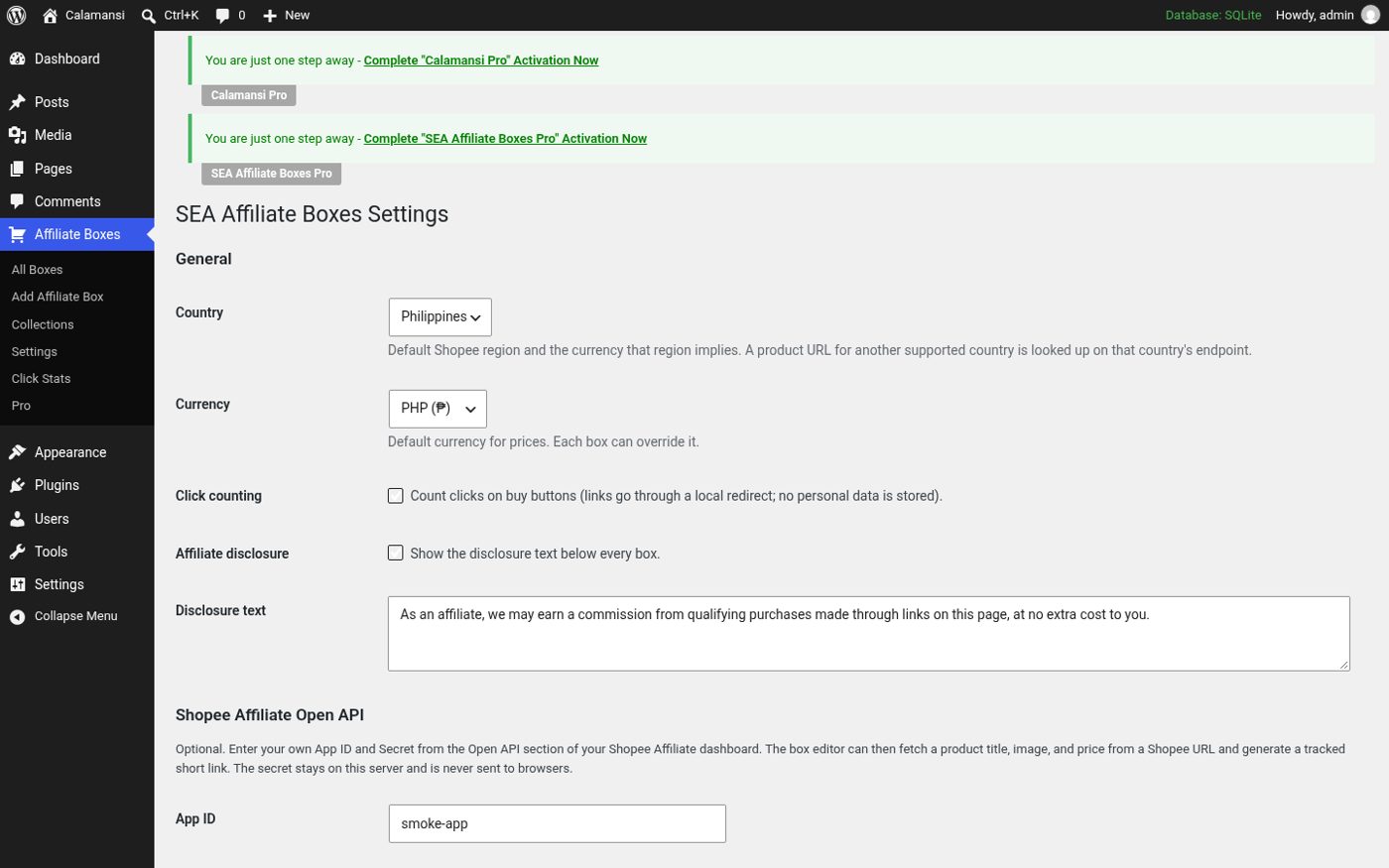
Open Affiliate Boxes → Settings. The important options are:
- Country and currency. The default currency is the Philippine peso (₱). Malaysian ringgit, Thai baht, Vietnamese dong, Indonesian rupiah, Singapore dollar and US dollar are also supported. Dong and rupiah are shown with the symbol after the amount (for example
150,000₫), which is how shoppers in those countries expect to see them. - Click counting. When it is on (the default), buy buttons link to a short redirect on your own site, which counts the click and then sends the visitor to the shop. When it is off, buttons link straight to the shop.
- Disclosure. An optional affiliate disclosure line under every box. Most affiliate programmes and many consumer-protection rules expect you to disclose affiliate links, so we recommend leaving it on.
Step 3: Create your first box
Boxes are saved separately from your posts, so you can reuse the same product in several articles and update the price in one place. Go to Affiliate Boxes → Add Box and fill in:
- Title – the product name as you want readers to see it.
- Image – an https image URL or an image from your media library.
- Price and, optionally, an original price. If you enter an original price it is shown crossed out next to the current price, which works well for sale items.
- Rating, a short badge (for example “Best budget pick”) and a one-paragraph description.
- Pros and cons – one per line. Keep them short; readers scan them.
- Buy buttons – add one row per shop. Pick Shopee, Lazada, TikTok Shop or Custom; each platform gets its own button colour. Button URLs must start with
https://.
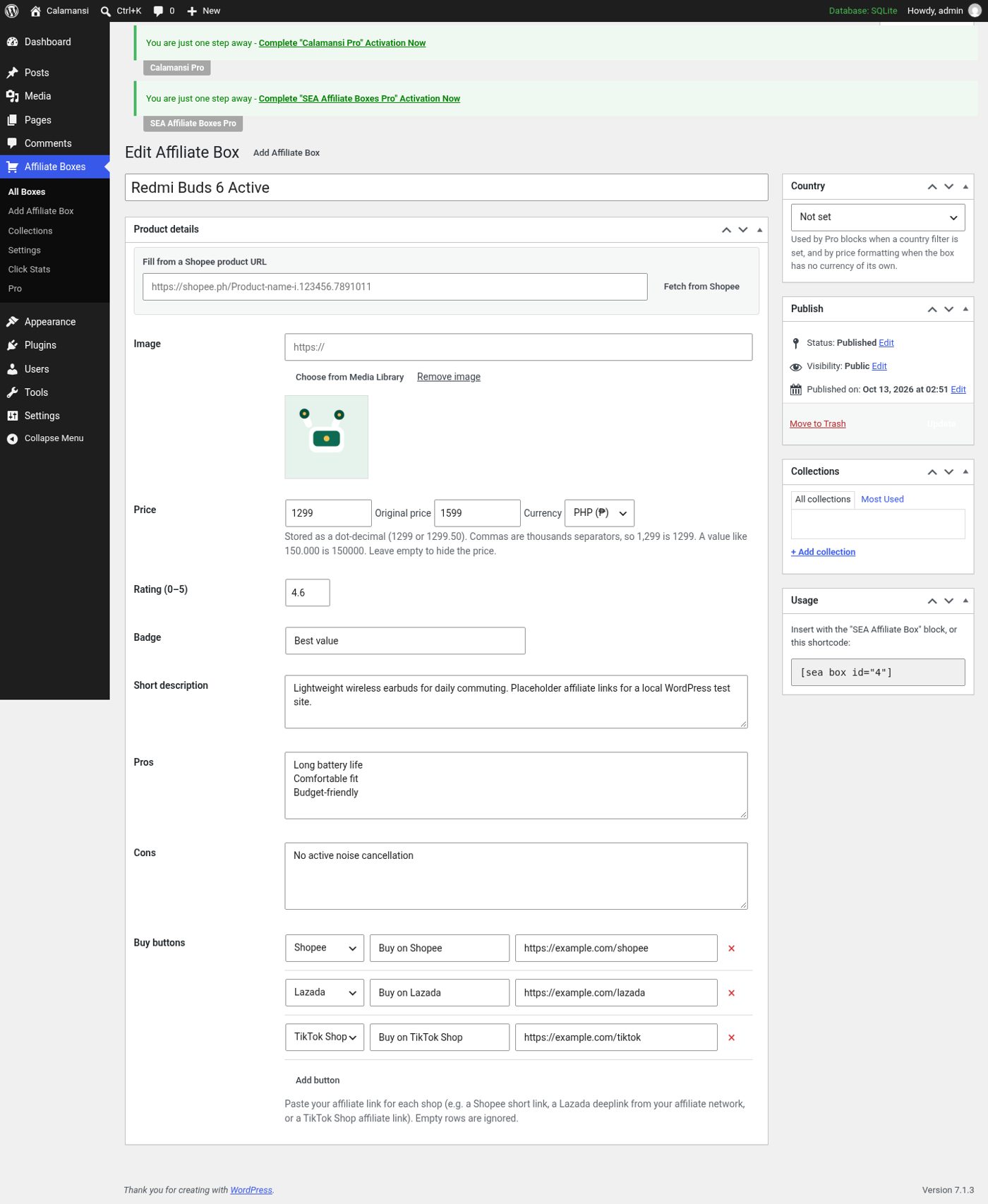
Click Publish. Only published boxes can send clicks through the redirect, which protects your site from being used as an open redirect.
Optional: fill details from Shopee Beta
If you have Shopee Affiliate Open API credentials, paste your App ID and Secret into the settings screen. (The secret is stored separately and never printed back into pages.) Then, on a box, paste a Shopee product URL and click Fetch from Shopee. The plugin asks Shopee for the title, image and price and creates a tracked short link for the buy button.
Two details worth knowing: empty fields are filled, but fields you already typed are left alone unless you choose Replace filled fields; and results are cached for 12 hours. Supported Shopee countries are the Philippines, Malaysia, Thailand, Vietnam, Indonesia and Singapore.
This feature is labelled Beta because it has been tested against Shopee's documented request format and a local mock, but not yet against a live Shopee affiliate account. If a lookup fails for you, fill the box by hand – every field works without the API – and tell us what error you saw.
Step 4: Insert the box into a post
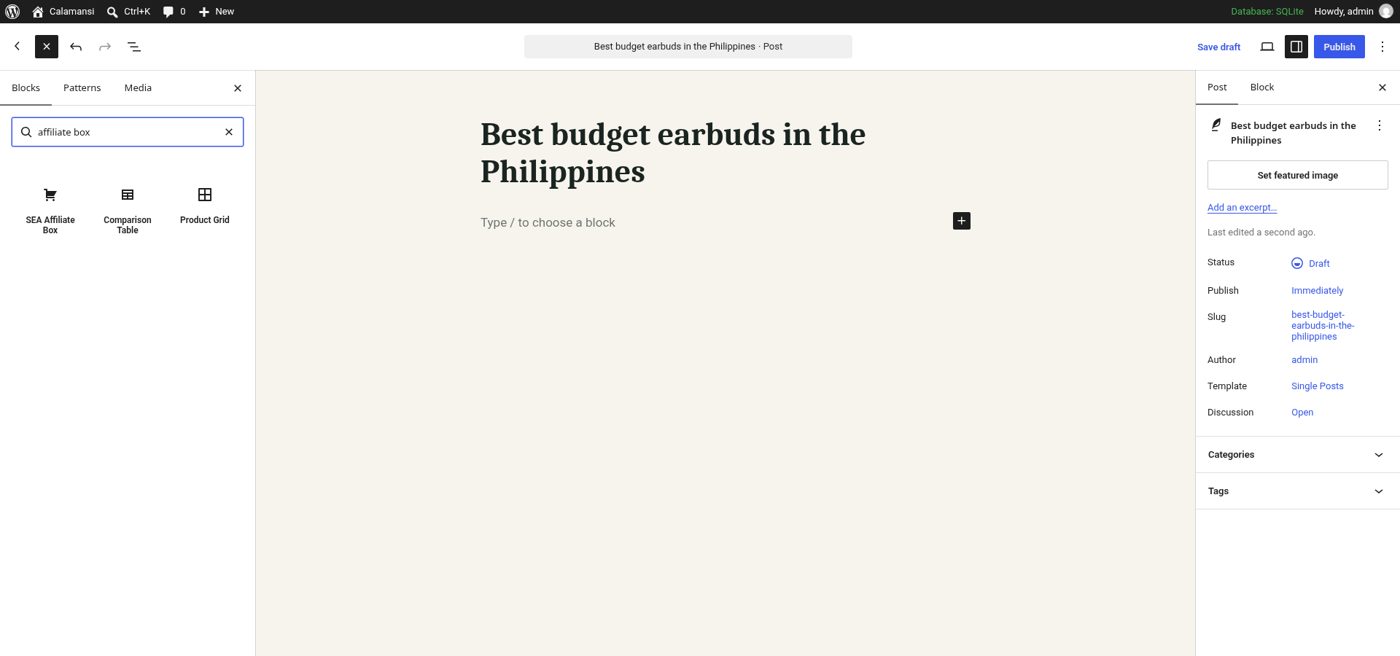
Open a post in the block editor, click the + inserter and search for “affiliate box”. Choose the SEA Affiliate Box block.
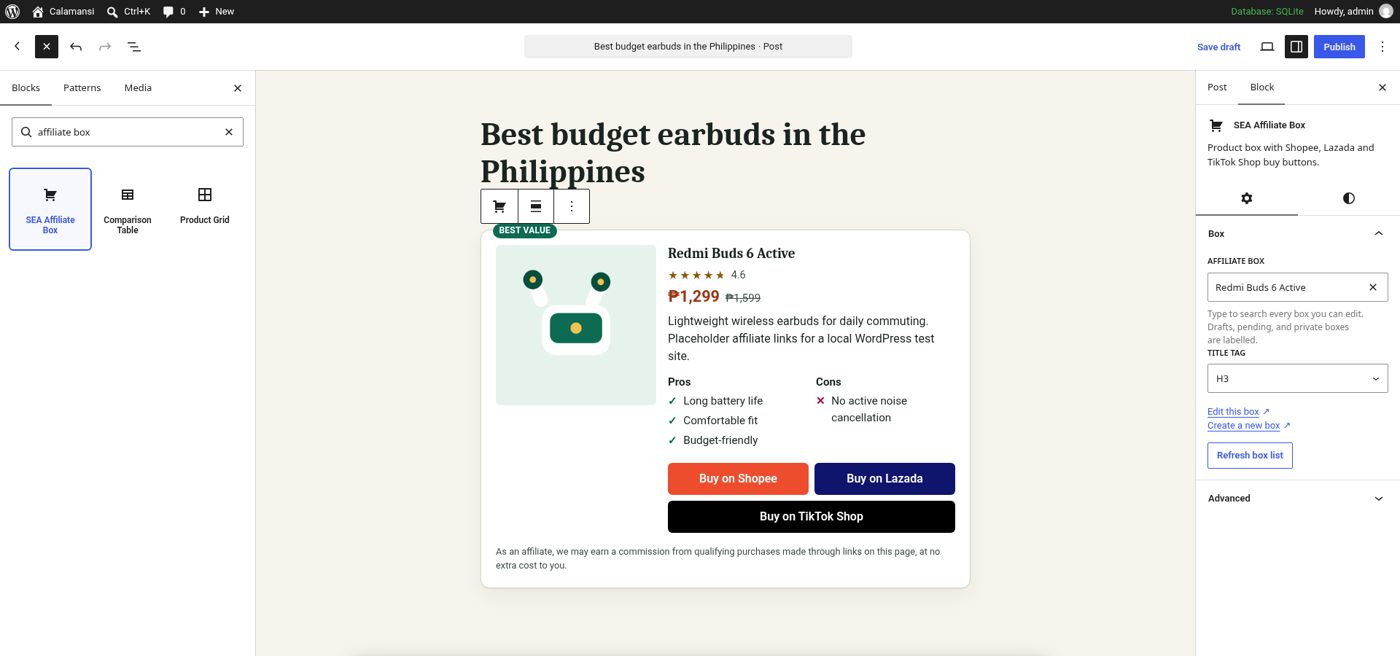
The block shows a searchable list of your boxes. It loads 20 at a time with a “Load more” button, and it also lists draft, pending and private boxes you are allowed to edit, clearly labelled, so you can place a box before it is published. Pick a box and the full preview appears in the editor.
Prefer shortcodes, or using the classic editor or a page builder? Use [sea_box id="123"], replacing 123 with the box ID shown in the Affiliate Boxes list. The block and the shortcode render the same HTML.
Step 5: Check it on the front end
Preview or publish the post. You should see the product image, price in your currency, rating, badge, pros and cons, and one coloured button per shop.
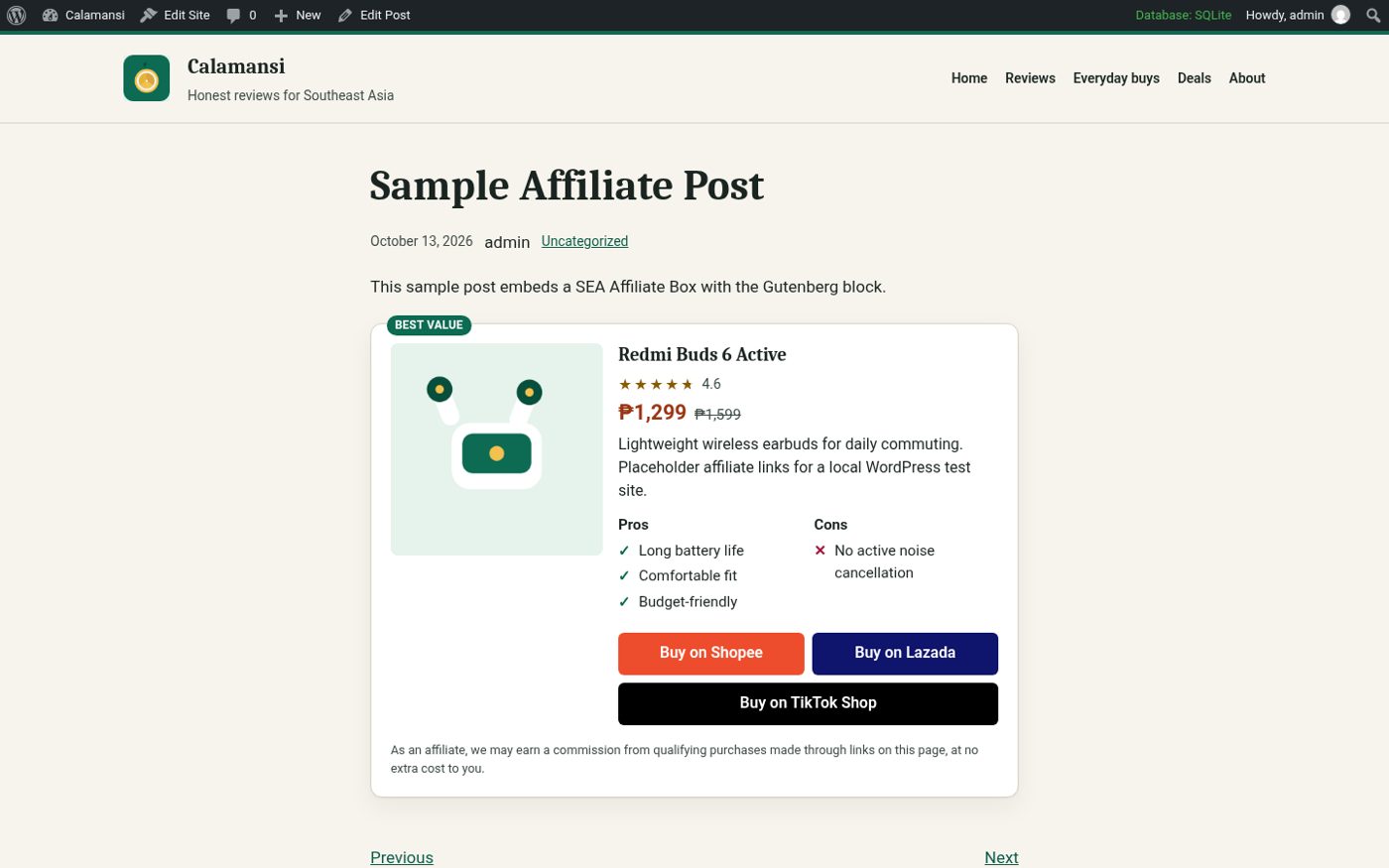
Behind the scenes, the buttons use rel="sponsored nofollow noopener" and open in a new tab, which is what Google recommends for affiliate links. The stylesheet is small, loads only on pages that contain a box, and there is no jQuery, so boxes won't slow down the rest of your site.
Step 6: See which buttons get clicked
With click counting on, go to Affiliate Boxes → Click Stats to see clicks per box, per post and per platform for a chosen period. This tells you, for example, whether your readers prefer Shopee or Lazada for a certain kind of product, so you can order the buttons accordingly.
The click log is deliberately minimal: box, post, button, platform, date and a counter. No IP addresses, cookies or account IDs are stored, which keeps your privacy policy simple.
Tips for boxes that convert
- Put the box where the decision happens – right after your verdict, not only at the end of the article.
- Offer more than one shop. Readers have favourite apps and vouchers. A Shopee and a Lazada button side by side lets them choose.
- Keep prices honest. Prices change constantly on marketplaces. Update boxes when you revisit an article, and consider adding “price at time of writing” to your disclosure.
- Use pros and cons you actually observed. Two or three specific points beat a long generic list.
Going further
When you start writing “best of” and “top 10” articles, one box per product gets long. SEA Affiliate Boxes Pro adds a comparison table block and a product grid block that reuse the boxes you already made, plus scheduled Shopee price refresh Beta, a broken-link scanner, click analytics by sub ID and bulk Lazada links through Involve Asia Beta. The next tutorial, how to build a top-10 comparison table, walks through it.
Launch offer: code LAUNCH30 takes 30% off your first payment (50 uses, until Nov 12, 2026). Get SEA Affiliate Boxes Pro with LAUNCH30